Two-factor authentication

To enhance the security of your account, we strongly recommend enabling two-factor authentication. This would bolster your account's protection with an additional layer of security beyond your password.

redirect.pizza provides TOTP-based two-factor authentication for all account types, and we strongly urge everyone to activate it.

Enabling two-factor authentication

  1. Login into your redirect.pizza account
  2. Navigate to your account settings
  3. Press "Enable two-factor"
  4. Scan the QR code with your favorite TOTP-based two-factor app. We recommend either Google Authenticator or Authy.
  5. After entering the code into the app, input the 6-digit code visible in the app and click on "Enable two-factor".

Forcing two-factor authentication on team level

Team owners may choose to enforce two-factor authentication on team level. By forcing two-factor authentication, all users that login must set-up 2FA before continuing.
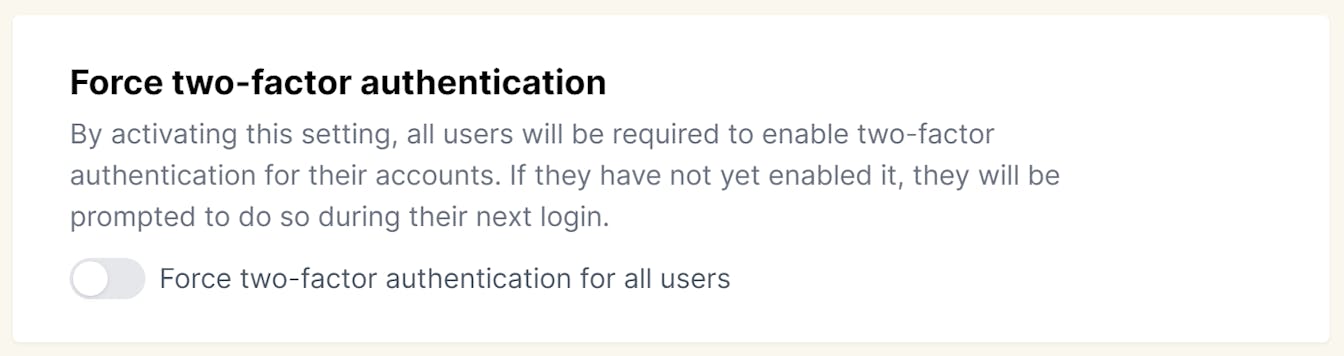
Force two-factor authentication

Resetting your two-factor details

If you've lost access to your two-factor authentication (2FA) codes, don't worry—we're here to help you reset it. To begin, we need to verify your identity. This involves adding a TXT record to one of the domains you're redirecting through redirect.pizza.

Here’s how to add the TXT record:

  • Create a TXT record with the following format: RP=2fa-verification-YYYYMMDD (replace "YYYYMMDD" with today's date).
  • After adding the TXT record, reach out to us at verifications@redirect.pizza. Include the domain name you've added the TXT record to.

Once we verify the record, we'll reset your two-factor authentication and restore access to your account. Please note that in some cases, additional validation steps may be required to ensure the security of your account.


More articles

Walkthroughs
GoDaddy: Forwarding with HTTPS support
Network Solutions: Forwarding with HTTPS support
Namecheap: Forwarding with HTTPS support
Hover: Forwarding with HTTPS support
TransIP: Forwarding with HTTPS support
Cloudflare: Forwarding with HTTPS support
Amazon Route 53: Forwarding with HTTPS support
NS1: Forwarding with HTTPS support
DigitalOcean: Forwarding with HTTPS support
Google Cloud DNS: Forwarding with HTTPS support
EuroDNS: Forwarding with HTTPS support
Azure DNS: Forwarding with HTTPS support
DNS Made Easy: Forwarding with HTTPS support
Freenom: Forwarding with HTTPS support
Mijndomein: Forwarding with HTTPS support

Domain redirects delivered hassle-free

Get started right away

  • Free plan
  • No creditcard required

redirect.pizza has all your favorite ingredients

Analytics

Who is still visiting those old domains? Gain valuable insight with detailed statistics and find out where the hits are coming from.

Learn more

API

Connect your software to automatically create redirects via our API. Automation makes your life easier.

Learn more

Destination Variables

You control how we handle your destination URL. Want to include your domain extension as a query string parameter? No problem.

Learn more

Dynamic destinations

Steer your traffic to different destinations, based on rules you define.

Learn more

Path forwarding

Keep the original path and keep it in the destination for a smooth domain migration and keeping your SEO game intact.

Learn more

Query Parameter Forwarding

Forward query parameters found on the source URL to the destination.

Learn more

Multiple Redirect Types

Choose the status code that works for you. Choose 301/307 (permanent), 302/308 (temporary) or frame your destination.

Learn more

Team management

Doing things all by yourself isn't much fun. Invite your co-workers to manage the redirects and work as a team.

Learn more

Automatic DNS

Integrate directly with your DNS provider, and apply the DNS changes from one platform.

Learn more

QR code generator

Create a QR code that you can use for marketing purposes. You can change the destination anytime after printing.

Learn more

Import & Export

Manage your redirects without losing precious time. Import and export redirects in our UX-friendly interface.

Global edge network

Redirecting in a blink of an eye; processing millions of request per hour in milliseconds.

Learn more

Broken destination monitor

Automatically checking your destinations to ensure it's reachable for everyone.

Learn more

Privacy First

We're based in Europe and are fully compliant with GDPR. Privacy-first!

Learn more

Wildcard subdomains

For when your domain utilizes a lot of different subdomains. Cover all subdomains with a single redirect.

Learn more

Tags

Group your redirects by adding tags. Keep everything organized and easy to find.

Bulk actions

Want to apply the same action for multiple redirects in one go? Do yourself a favor and start using bulk actions.

Dark mode

Give your eyes some well deserved rest by using the dark mode. Sync with your system or choose manually.

HSTS

Enable HSTS (HTTP Strict Transport Security) on team or domain level for an extra layer of protection.

Learn more

Change Destination Anytime

Once you're set up, you can change the destination URL anytime you want, and see the change in real-time.

Two-Factor Authentication

Secure your account with TOTP two-factor authentication. Scan the QR code, setup your app of choice, and you're safe(er).

Learn more

IDN Support

Add international hostnames with non-Latin characters. We ❤ that.

Support

Chat away! We're happy to help set up your account and answer your questions.